Your Google Ads are getting clicks. People are visiting your website. Google is happily spending your budget.
But the phone isn’t ringing, the contact form is quiet, and you’re starting to wonder what you’re actually paying for.
It’s frustrating, particularly when the campaign dashboard makes everything look reasonably healthy.
The problem is that a click isn’t the same as a potential customer. It simply means somebody was interested enough in your advert to visit your website.
If your Google Ads are getting clicks but no enquiries, there are a few places things could be going wrong. The trick is working out which one is responsible before spending more money trying to fix it.
First, Work Out What the Problem Actually Is
Before changing keywords, rewriting adverts or increasing your budget, look at what is happening.
| What you’re seeing | What it could mean | What to check first |
| Clicks, but zero recorded conversions | Tracking may be broken, or nobody is enquiring | Test conversion tracking and enquiry routes |
| Lots of clicks from irrelevant searches | Your targeting may be too broad | Search terms report |
| Relevant clicks, but very few enquiries | The landing page or offer may be putting people off | Landing page and mobile experience |
| Plenty of enquiries, but poor-quality leads | The adverts may be attracting the wrong expectations | Keywords, ad messaging and qualification |
| Enquiries arriving but few becoming customers | The problem may happen after the lead comes in | Response times and sales follow-up |
These aren’t definite diagnoses. They’re starting points. If your contact form is broken, adjusting keywords won’t fix it. If you’re attracting people who want something you don’t sell, redesigning your landing page won’t solve the underlying problem either.
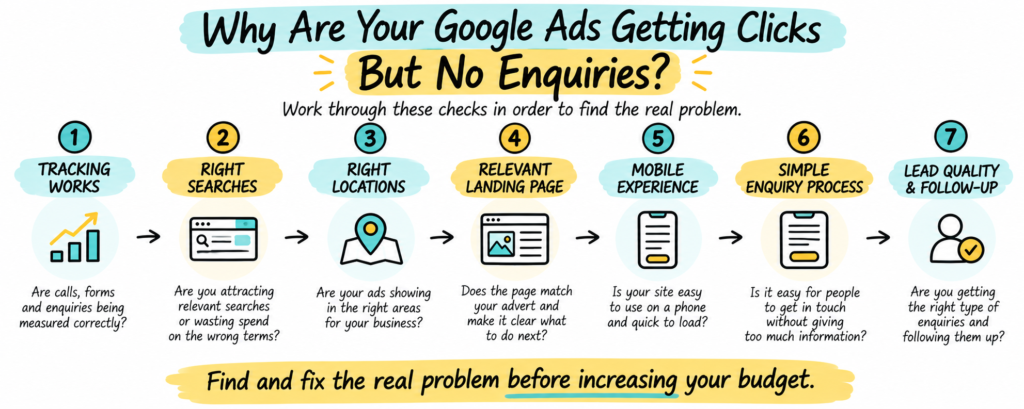
1. Make Sure Your Conversion Tracking Actually Works
This is where we’d start.
Google Ads can report clicks perfectly well while missing the actions that matter to your business. Someone might click your advert, visit your website and telephone you. If that call isn’t being measured correctly, your account may show a click but no conversion.
The same can happen with contact forms, bookings or other enquiry methods.
Open Google Ads and look at Goals, then Conversions. Check which actions are being counted and whether they’re the actions you actually want people to take.
Then test the website yourself. Submit a test enquiry. Check that it arrives. Test the phone number. Make sure the confirmation page or form-success event works as expected.
You’ll also want to check whether Google Ads is measuring meaningful actions rather than simply counting visits to a contact page or clicks on a button that don’t result in an enquiry.
Google’s conversion measurement guidance explains how tracking connects customer actions to campaign performance.
This matters beyond reporting. If you’re using automated bidding to generate conversions, the system needs suitable conversion signals to make useful decisions. Don’t assume tracking is broken just because Google Ads and GA4 show different visitor numbers: clicks and sessions are different metrics.
2. Check What People Actually Searched For
Here’s a common problem. A business sells a specialist service. Its adverts receive plenty of clicks. But the searches triggering those adverts reveal that some people want something completely different.
Imagine you are an accountant advertising bookkeeping services. You might want searches such as:
- Bookkeeping services for small businesses
- Outsourced bookkeeping company
- Bookkeeper for limited company
But you might also be paying for searches about bookkeeping courses, free software or bookkeeping jobs. Those people may be interested in the subject. They’re just unlikely to become customers.
Where to look
In Google Ads, open your campaign’s search terms report. Look at the actual searches that generated clicks and cost, particularly those responsible for the most spending.
Ask yourself: if somebody typed this into Google, would we genuinely want to pay to bring them to our website?
If not, investigate whether to exclude the term using negative keywords or adjust your targeting. Don’t exclude useful searches simply because they haven’t converted yet. The aim isn’t necessarily fewer clicks. It’s more of the right clicks.
3. Are Your Ads Appearing in the Right Locations?
Location targeting can be another source of wasted spend, especially for businesses serving a particular area.
Suppose you provide a service across Staines, Egham and nearby parts of Surrey. You probably don’t want a large share of your budget spent on people who are nowhere near your service area and have no realistic intention of using your business.
Depending on your settings, Google Ads may reach people who have shown an interest in a location, not just people physically in or regularly in that area. That can be useful for some businesses. For others, it creates irrelevant clicks.
For a fuller explanation, see our guide to how Google Ads location targeting actually works.
Review targeted locations, location options and geographic performance. Check whether the locations generating spend make commercial sense. Businesses serving customers nationally may need a different approach.
4. Does Your Landing Page Match What the Advert Promised?
Someone searches for “emergency boiler repair near me”, clicks an advert offering emergency repairs and lands on a general homepage about installations, servicing and the history of the company. Somewhere in the navigation there may be a repair page. But why should the visitor have to look for it?
Your landing page should immediately reassure visitors that they have come to the right place. Make it obvious what you offer, who it is for, where it is available, why they should consider you and what to do next.
It doesn’t necessarily mean building a new page for every keyword. It means making sure the advert and the website work together. If your advert promises a free quotation, visitors shouldn’t have to hunt for a way to request one.
5. Check Your Website on a Mobile Phone
Don’t just look at your website on your office computer. Open the actual Google Ads landing page on your phone and use it as though you’ve never visited the business before.
Can you read everything comfortably? Is the contact button obvious? Does the form work? Can you tap the telephone number? How long does the page take to load?
Cookie banners covering the page, difficult pop-ups and forms with tiny fields can make the process frustrating. Sometimes the most useful improvement is simply making one important page easier to use.
6. Are You Making It Too Difficult to Enquire?
Imagine you’ve found a business that appears to offer exactly what you need. You’re ready to get in touch. Then its form asks for your full address, company turnover, budget, preferred appointment date and a detailed project description.
You might complete it. Or you might try the next company instead. For many service businesses, the first enquiry doesn’t need every detail required to deliver the work. It just needs to start a useful conversation.
Could you shorten the form, make the phone number easier to find or explain what happens after somebody enquires? Make it easy for interested visitors to take the next step.
7. Are You Getting Enquiries, Just Not the Right Ones?
There’s another version of this problem: your Google Ads are generating leads, but they’re not very good. People want services you don’t provide, live outside your area or expect something much cheaper.
Look at the relationship between keywords, adverts and landing pages. A company specialising in commercial projects, for example, may need to make that clear to avoid attracting homeowners.
Also look at what happens after a lead arrives. Are enquiries answered promptly? Is someone responsible for follow-up? Do you know which leads become customers? Ten suitable enquiries may be worth more than fifty people who were never likely to buy.
8. Have You Actually Had Enough Clicks to Judge?
It’s tempting to decide that a campaign isn’t working after a few days. But a handful of clicks may not tell you much.
As a simple illustration, at a 3% enquiry conversion rate, 100 clicks would produce an average of three enquiries; 20 clicks would produce an average of less than one. That’s an illustration, not a benchmark for your industry.
There isn’t a magic number of clicks that works for every business. It depends on your industry, cost per click, customer value and how likely people are to enquire on their first visit. Before major changes, check whether the campaign has enough meaningful data.
Should You Pause Your Google Ads?
Not necessarily. If relevant visitors are reaching a broken contact form, fixing the form may be the priority. If you’re paying for irrelevant searches, you may need to stop that waste while correcting targeting. If tracking is misleading automated bidding, investigate it before judging performance.
Avoid making several major changes at once. Otherwise, it’s harder to work out which adjustment helped.
What We’d Check First
If a business came to us with a Google Ads account spending money but producing few enquiries, we’d start with the evidence. Not by immediately recommending a bigger budget or rewriting every advert just to look busy.
- Confirm that forms, calls and important enquiries work and are measured.
- Review search terms responsible for the most spending.
- Check location targeting against the real customer base.
- Compare advert promises with landing pages.
- Test the enquiry journey on mobile.
- Review lead quality, not just the conversion count.
- Check whether there is enough data to make a sound decision.
Once you know where the problem is, you can make changes for a reason. That’s better than repeatedly increasing the budget and hoping the next batch of clicks behaves differently.
Getting More from Your Google Ads Budget
Google Ads can reach people actively looking for your services, but paying for visitors only makes sense if those visitors have a reasonable chance of becoming customers.
When your adverts get clicks but no enquiries, the answer isn’t always more spending. Sometimes it’s targeting, sometimes the website, and sometimes enquiries are happening but aren’t being measured properly.
At The Bright Click, we help businesses understand what is happening with their paid advertising and where their budget could work harder.
If your Google Ads are spending money without producing the enquiries you expected, explore our Google Ads and paid advertising services and request a free Ads Account Review, or get in touch with our team to discuss what may be going wrong.